

Growth & Launches
Where to find it: Home → Your apps → Growth (at the top of the screen the module shows as Growth & Launches)
Address: /app/modulos/growth-lancamentos
Under Your apps this module appears with the short name Growth. The full name, which appears at the top of the screen when you enter, is Growth & Launches. It's the same module.
First things first: translating the strange words
This module is the one that uses the most internet slang on the whole platform. So, before anything else:
Growth just means growth. But not growth in the sense of "selling more, fingers crossed". It's growth in the sense of a method: you pick one number to track, run small tests, keep what worked and throw out what didn't work. It's the opposite of changing everything at once and never knowing what paid off.
Loop means a cycle that feeds itself. It's when a new customer produces the next new customer without you spending again. Three real examples:
- Pizzeria: every pizza box goes out with a little card: "refer a friend, you both get a free stuffed crust". The customer refers, the friend becomes a customer, the friend gets another little card in their box. The loop has turned.
- Salon: whoever brings a friend gets a free blow-dry, and the friend gets 20% off the first visit. The friend leaves knowing she can bring someone too.
- Drain cleaner: you leave a fridge magnet at every job. The neighbor sees the magnet in a friend's kitchen and calls. The friend gets a discount on the next job.
The opposite of a loop is an ad: with an ad, every new customer costs the same as the first, forever. This module's panel says it in so many words: "You have no growth loop — without one, every new customer costs the same effort as the first."
Launch is when you concentrate your sales effort into a short, set period, instead of selling the same way all year. Opening a new location, starting to sell a service you never offered, a big store-anniversary promotion — all of that is a launch.
Conversion is the percentage of people who take the next step. Out of every 100 who see your ad, how many click? Out of every 100 who open your site, how many ask for a quote? Improving conversion means winning more customers without spending one more real on ads. The system sometimes calls this CRO, short for "conversion rate optimization".
ICE is the score that orders your idea queue. It's three scores from 1 to 10 — Impact, Confidence and Effort — and the system calculates the result on its own. It's explained in detail further down, in How to read the numbers.
What it's for
Every business owner has a list of ideas in their head: "I should do a referral program", "I should change the text on the site", "I should launch that combo". That list never leaves your head, and when it does, it comes out in the wrong order — you do the hardest idea first, it takes three months, it goes wrong, and you give up on the rest.
This module takes the list out of your head and puts it in an ordered queue. Each idea gets three scores and the system calculates which one gives the most return per hour of work. You work from the top down. The expensive, doubtful ideas stay at the bottom, where they don't get in the way. And every idea you test leaves the queue with the result written down — it becomes the memory of what has already been tried, which you and Gabriel check before choosing the next one.
Along with that, it keeps three plans that most businesses never write down: your referral loop (what makes a customer bring another one), your launch plan (what to do week by week when you open something new) and your conversion hypotheses (what to change on the site or in your service to close more with the same traffic).
Here you don't talk to just one assistant: there are four, each owning a part. Gabriel takes care of strategy and experiments, Pedro takes care of growth without ads (the loops), Amanda takes care of launches and Luana takes care of conversion. In the chat on the Home tab you choose who to talk to.
Day-to-day example. You have a pizzeria. Your ideas were: hire a delivery rider, do an all-you-can-eat night on Wednesdays and put a referral card in the box. You give the scores: the referral card is easy (Effort 2), you're pretty sure about it (Confidence 7) and the impact would be good (Impact 6) — score 21. The Wednesday all-you-can-eat night is a lot of work (Effort 8) and you're not sure (Confidence 4) — score 3.5. The queue sorts itself and you start with the card, which costs almost nothing. In two weeks you know whether it worked: you mark the card as done, write down "3 referrals in 40 deliveries" and it moves down to Already tested — the next one in the queue moves to the top.
Before you start
- The Growth & Launches module has to be active on your account. Otherwise, the screen shows the offer with the Activate in catalog button, and any attempt to open or save returns the warning "The Growth & Launches module is not active on this tenant. Turn it on in the Modules tab to use it." (tenant = your company's account).
- The first time you open a newly purchased module, an invitation appears at the top of the page to set it up by chatting with Gabriel: "It's optional — the tabs below already work. Each reply from the specialist uses AI credits." Chat with Gabriel lets him get to know your company; Dismiss removes the invitation without chatting. If you open the chat, the Complete setup button at the end of it also removes the invitation.
- No connection, password or third-party account is needed. It's a planning module: it keeps decisions, it doesn't fire off campaigns or touch ad accounts.
- There's no required order. Each tab saves its own part. Start with whichever makes sense for your moment.
First steps
- On Home, under Your apps, click Growth. You land on the Home tab.
- If Gabriel's invitation appears, you can accept (Chat with Gabriel) or click Dismiss — the tabs already work either way.
- Still on the Home tab, use the chat in the right column: ask "build an experiment backlog for me". He writes a first queue of ideas.
- Review the ideas and adjust the Impact, Confidence and Effort scores with your own judgment — you're the one who knows the real effort.
- Click Save strategy. The queue reorders itself from the best score to the worst.
- Go to the Viral loops tab and write your referral program, even if it's simple. Click Save loop.
- If you have something to launch in the coming months, go to the Launch tab and build the timeline in phases. Click Save launch.
- On the Conversion tab, write down the changes you suspect would increase closings. Click Save hypotheses.
- Come back here every week and run the idea at the top of the queue. When the test is done, mark the idea as Done, write What happened and click Save strategy.
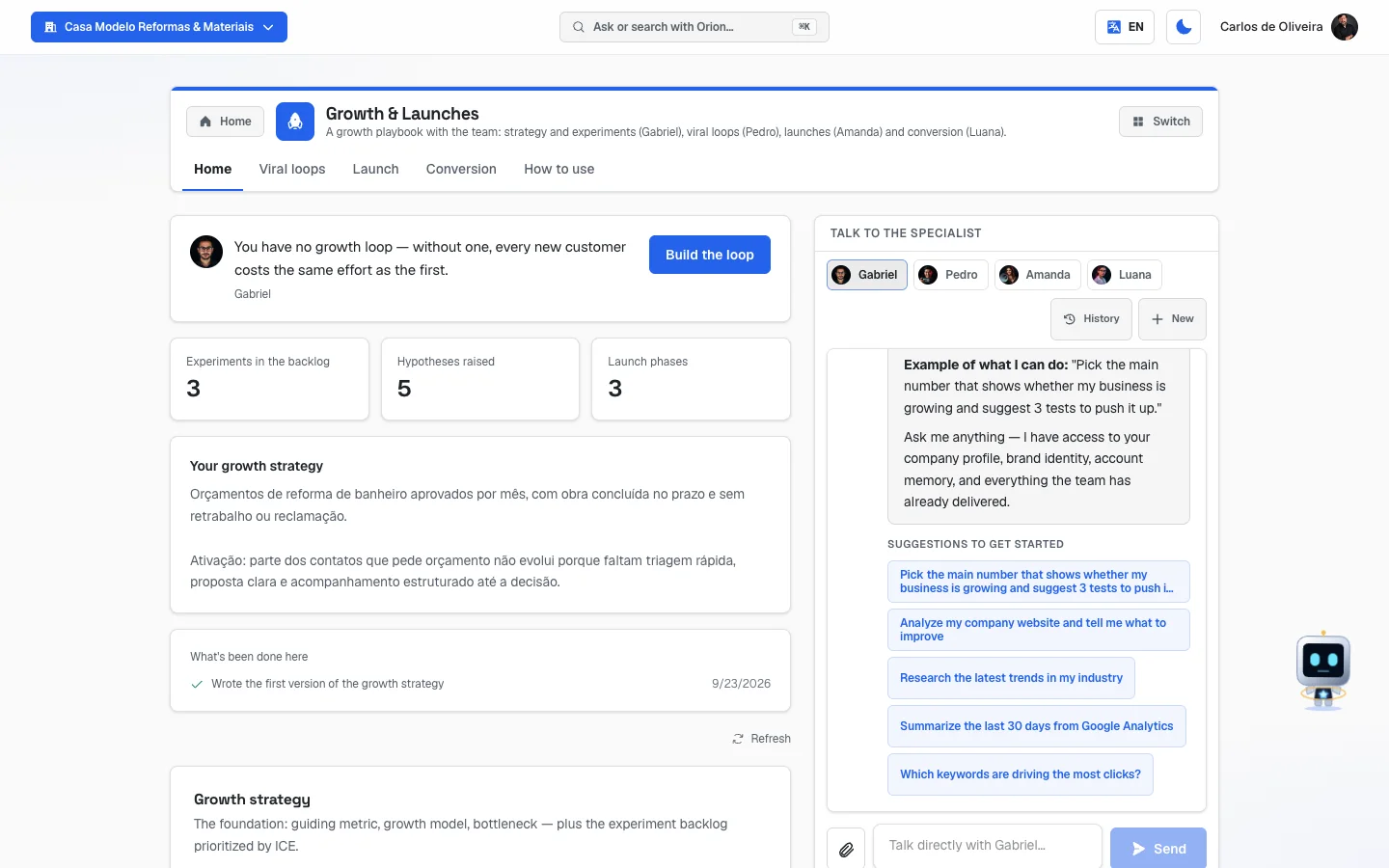 Home tab of Growth, with Gabriel's panel at the top, the strategy fields and the chat with the four specialists on the right
The tabs, one by one
The tabs are in the app bar, at the top of the screen, in this order: Home, Viral loops, Launch, Conversion and How to use. They all have a Refresh link in the right corner, to reload what's saved. The chat with the four specialists only appears on the Home tab.
Home
/app/modulos/growth-lancamentos/inicio
- What you see here:
- At the top, Gabriel's panel: a note from him with a button for the next step (for example, Build the loop), three numbers (Experiments in the backlog, Hypotheses raised and Launch phases) and, when it exists, a box "Your growth strategy".
- The Growth strategy section, with three fields and the experiment queue.
- In the right column, the Talk to the specialist box, where you choose between Gabriel, Pedro, Amanda and Luana.
- What you can do: set the base of the strategy, build the experiment queue and, after testing each idea, write down what happened.
Each field explained:
| Field | What to write |
|---|---|
| North Star Metric | In plain English: your guiding metric. It's the one number that shows whether your business is really delivering value — and, on purpose, it's not revenue. For a pizzeria it could be "pizzas delivered hot and on time per week". For a salon, "customers who come back in the month". For a locksmith, "calls handled in under 40 minutes". The idea is: if that number goes up, the money follows. |
| Growth model | Where your customers come from today. The field itself suggests the options: viral (word-of-mouth referral), paid (ads), content (posts, videos, blog), product (the service itself brings more people), referral (a formal referral program with a reward) or mixed. Write what's true today, not what you'd like. |
| Bottleneck (AARRR) | Where you lose the most people. AARRR is just a list of five moments: Acquisition (the person discovers you), Activation (they try you for the first time), Retention (they come back), Revenue (they pay, and pay more) and Referral (they recommend you). Write which of those five you're leaking at. E.g.: "lots of people ask for a quote and vanish — the problem is activation". |
The experiment queue (Experiment backlog):
Backlog is just the word the system uses for "queue of things to do". Each row is an idea you're going to test — and, once tested, it stays saved with what happened.
| Row field | What to write |
|---|---|
| Experiment name | The idea's short name. E.g.: "Referral card in the box". Up to 160 characters. |
| Hypothesis | What you think will happen, and why. E.g.: "If every box goes out with a referral card, I think 5 out of every 100 customers will bring someone, because almost every order is from a family." |
| Impact | From 1 to 10: if it works, how much does it change your business? |
| Confidence | From 1 to 10: how sure are you that it'll work? |
| Effort | From 1 to 10: how much work is it? Here, a small number is good — 1 is "I'll do it this afternoon", 10 is "it'll take three months". |
| ICE | You don't fill it in. The system calculates it and shows it on the right side, live. |
| Done | The little checkbox at the bottom of the row. Check it when you've already tested the idea — whether it worked or not. |
| What happened | Appears when you check Done. Write the result with numbers, if you have them. E.g.: "Tested for 2 weeks: 3 referrals in 40 deliveries. Worth repeating with a bigger reward." Up to 4,000 characters. |
Step by step — building the experiment queue:
- On the Home tab, scroll down to Experiment backlog and click Add.
- Fill in the Experiment name and the Hypothesis.
- Give the three scores: Impact, Confidence and Effort, each from 1 to 10. The ICE number appears right away, on the right side.
- Repeat for the other ideas (up to 20 open ideas fit in the queue).
- Click Save strategy. "Saved" appears.
- The list reorders itself, from the highest ICE score to the lowest. Ideas without a complete score go to the end.
- To delete a row, click Delete, in its right corner.
If you don't fill in anything on a row, it disappears when you save. That's on purpose: a blank row isn't an idea, it's clutter in the queue.
You don't have to give all three scores. Without them, the ICE stays
—and the row goes to the end of the queue. But it's by giving the scores that the queue becomes useful.
Step by step — after testing an idea:
- On the row of the idea you tested, check the Done checkbox.
- The What happened field appears. Write the result: what you did, for how long and what changed. A number is worth more than an impression: "3 referrals in 40 deliveries" teaches more than "it kind of worked".
- Click Save strategy.
- The idea leaves the top and moves down to the Already tested block, at the end of the list. It isn't deleted: it stays there, with the result, so that you (and Gabriel) remember what has already been tried.
The idea only moves down when you save. Until you click Save strategy, the checked row stays where it was — so it doesn't jump around while you write.
Gabriel reads what you wrote down. Before suggesting the next idea, he checks the Already tested block and the result of each one: he doesn't propose again what already failed without saying what's different this time, and he uses what worked to choose the next step. You can also tell him the result in the chat and ask him to write it down ("I tested the referral card: we got 3 referrals in 40 deliveries, write that down") — he marks the idea as done and writes the result for you. When he saves the queue, the ideas already tested and what you wrote on them stay saved.
Want to test a finished idea again? Uncheck Done and save: it goes back into the queue, with the previous result still written down. That can only be done on the screen — Gabriel can mark an idea as done, but he doesn't reopen it. With a full queue (20 open ideas), the checkbox is grayed out until you free up a spot.
Space: the Already tested ideas don't take up the queue's 20 spots. They have their own space, up to 30. When that space fills up, the Done checkbox of the open ideas is grayed out — delete an old tested idea to free up room.
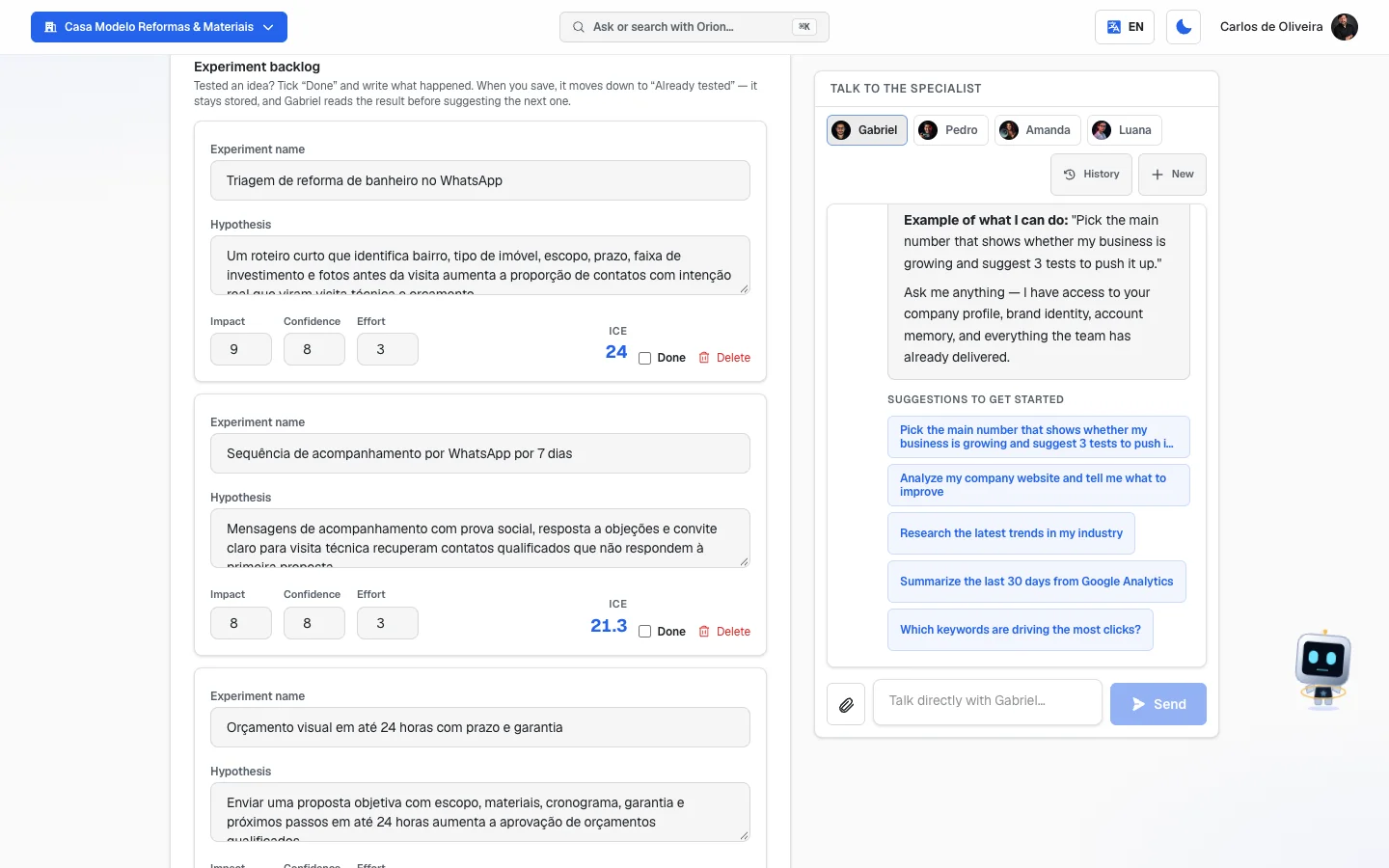 The Experiment backlog with three filled-in ideas — each one with Experiment name, Hypothesis, the Impact, Confidence and Effort scores, the calculated ICE on the right (18.7 and 18), the Done checkbox and the Delete button — and, in the right column, the Talk to the specialist chat with Gabriel, Pedro, Amanda and Luana
Empty state: with no ideas at all, "No experiments in the backlog" appears with the explanation "The backlog is your company's growth-test queue, sorted by potential." and two tips: ask Gabriel in the chat, or add one right there.
About the chat with the four specialists: in the Talk to the specialist box, you choose who to talk to. Each one takes care of their own part:
| Specialist | Takes care of | Ask for things like |
|---|---|---|
| Gabriel | Strategy and experiments | "build an experiment backlog", "what should my guiding metric be?", "I tested the referral card and got 3 referrals, write that down" |
| Pedro | Growth without ads, referrals, content | "design a referral program for my salon" |
| Amanda | Launches | "build the timeline so I can launch a new service in 6 weeks" |
| Luana | Conversion | "suggest hypotheses to increase my site's conversion" |
Viral loops
/app/modulos/growth-lancamentos/loops
- What you see here: the Viral loops & organic section — "The referral mechanic that feeds itself." — with four fields.
- What you can do: write your referral program and save it.
Each field explained:
| Field | What to write |
|---|---|
| Loop type | What kind of cycle yours is. The field suggests: inherent (the service itself makes it show up — the sticker on the van that everyone sees on the street), incentivized (you give something in exchange for the referral), community (a group of customers that brings people) or content (a video or post that people share on their own). |
| Referral incentive | What each side gets. The example on the screen is "$20 credit for referrer and referee". Give something to both sides — the person who refers feels awkward if the friend gets nothing. |
| Mechanism (step by step) | How the cycle works, from start to finish. Write it numbered, as if explaining to an employee: "1. At the end of the job I hand over the card. 2. The card has the customer's name handwritten on it. 3. Whoever arrives with the card gets 20% off. 4. The following month I send the referrer's discount on WhatsApp." |
| Notes & risks | What can go wrong and how to avoid it. The two classic risks are written in the field itself: opportunism (people creating fake customers just to grab the prize) and fatigue (the customer gets tired of being asked for referrals every week). |
About the example in reais in that field: the example's amount comes in the currency your subscription is billed in, not the screen language. In Brazil it shows as "R$ 20 in credits…"; on an account billed in Chile, "CLP 4,900 in credits…"; on all the others, in dollars. Switching the panel language to English or Spanish does not change the currency — what decides it is your account's Billing country — explained in the section of the same name in the Account, plan and billing chapter. It's only an example to give you the idea: write the amount you are going to give.
Step by step:
- On the Viral loops tab, fill in the four fields.
- Click Save loop. "Saved" appears.
Where to start if you've never done this: the cheapest loop in the world is the ask made at the right moment. The minute the customer says "it looks great", you say: "if you refer someone, you both get X". Write that sentence in the Mechanism field. You don't need a system, a coupon or an app.
Launch
/app/modulos/growth-lancamentos/lancamento
- What you see here: the Launch plan section — "Launch type, the phased timeline and the offer." — with two fields and the Timeline.
- What you can do: write the type and the offer, and build the phases.
Each field explained:
| Field | What to write |
|---|---|
| Launch type | What format you're going to use. The field suggests a few market names, explained below. If none fits, write it in your own words: "anniversary promotion, 5 days". |
| Offer | The complete package the person is going to buy. The field reminds you of the formula: product + bonus + guarantee + urgency. E.g.: "Complete installation (product) + 1 free check-up within 90 days (bonus) + 1-year warranty (guarantee) + only for the first 10 this month (urgency)". |
What the names that appear in the "Launch type" field mean:
| Name | In plain English |
|---|---|
| PLF | Phased launch: you spend a few days delivering free content (lessons, tips, live sessions) and only at the end open the sale, for a few days. |
| Evergreen | Always open. The offer stays up all year, with no end date. |
| Flash | Super short: it opens and closes in a few days (or hours). It lives on urgency. |
| Soft launch | Opens quietly, first to a small group (past customers, a single neighborhood), to test before opening to everyone. |
| PLG | When the product itself is what sells: the person tries a free or simple version and, if they like it, pays for the full one. |
Step by step — building the timeline:
- On the Launch tab, scroll down to Timeline and click Add phase.
- Fill in:
- Phase — the name of that stretch. E.g.: "Warm-up", "Opening", "Final stretch", "Closing".
- Period — when. E.g.: "March 1–7", "Week 1", "The last 3 days".
- Actions — what to do in that stretch, item by item. E.g.: "Post 3 stories a day about the problem; send 1 WhatsApp to the list; notify past customers."
- Repeat for the other phases (up to 15 fit).
- Click Save launch. "Saved" appears.
- To remove a phase, click Delete, on the phase itself.
Unlike the experiments, the phases are not reordered by score. They stay in the order you registered them — so register them in calendar order.
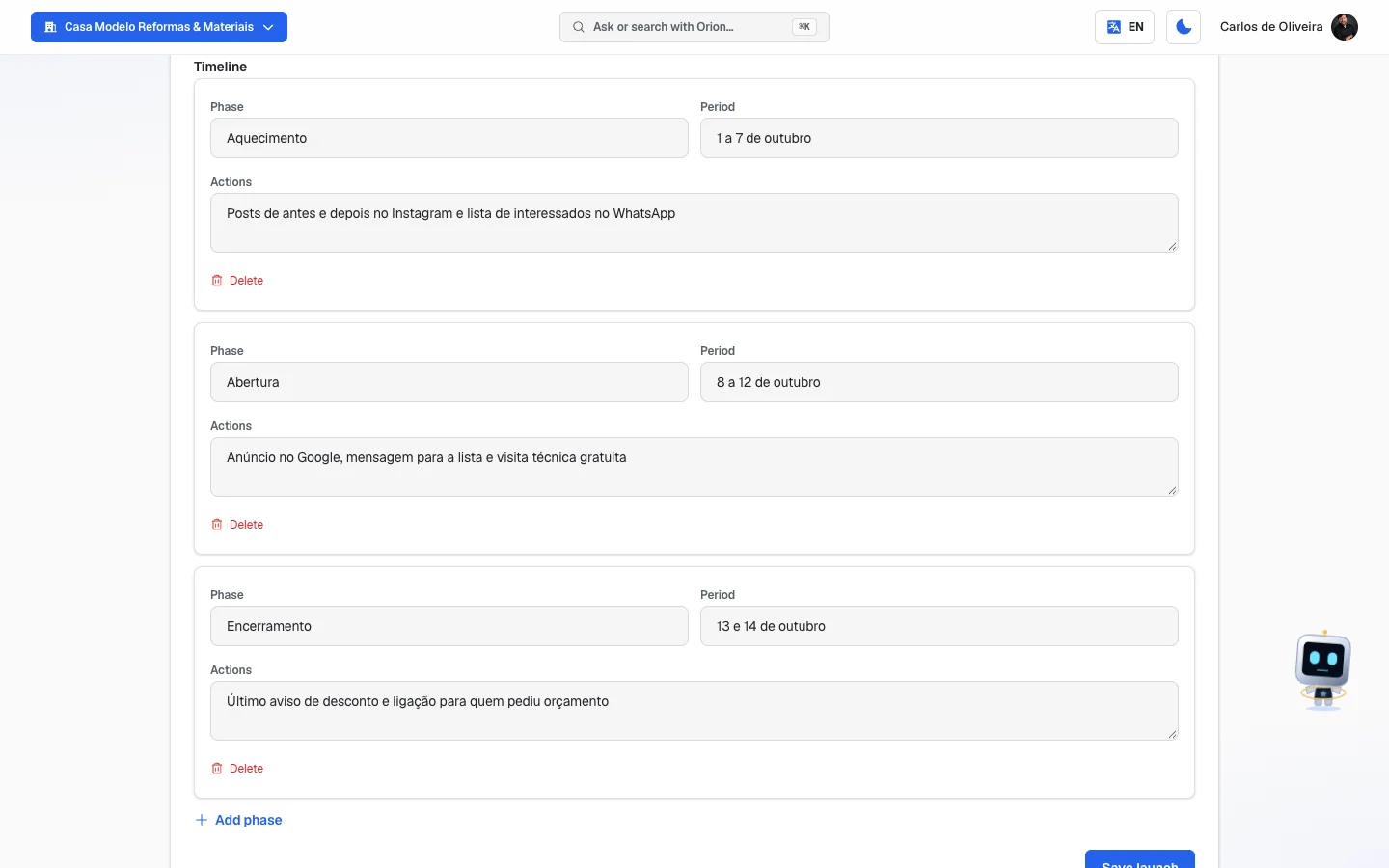 The Timeline on the Launch tab with three filled-in phases (warm-up, opening and closing), each with Phase, Period, Actions and the Delete button; below, the Add phase link and the Save launch button
Empty state: with no phases, "The launch has no phases yet" appears with the explanation and the tips to ask Amanda in the chat or add the first one right there.
Conversion
/app/modulos/growth-lancamentos/conversao
- What you see here: the Conversion (CRO) section — "Conversion hypotheses prioritized by ICE." — with the Conversion hypotheses list.
- What you can do: write down the changes you think would get more people to close, score each one and let the queue sort itself.
Each field explained:
| Field | What to write |
|---|---|
| Current element | What's there today, and where. E.g.: "'Learn more' button at the bottom of the home page". Up to 160 characters. |
| Expected metric | The number you expect to see move. E.g.: "Quotes requested through the site". |
| Proposed change | What you want to change, and why. E.g.: "Replace 'Learn more' with 'Ask for a quote on WhatsApp', because almost everyone already arrives wanting to talk to someone." |
| Impact, Confidence, Effort | The same three scores from 1 to 10 as the experiments. |
| ICE | Calculated automatically. |
Step by step:
- On the Conversion tab, click Add.
- Fill in the three text fields and give the three scores.
- Repeat for the other ideas (up to 20 fit).
- Click Save hypotheses. "Saved" appears and the queue reorders by ICE score.
- To delete, click Delete on the row.
Empty state: "No conversion hypotheses yet" appears with the explanation "Each row here is a bet on improvement — what to change, where and why — scored by impact, confidence and effort (ICE)."
What's the difference between an experiment (Home tab) and a hypothesis (Conversion tab)? The experiment is for bringing in more people. The conversion hypothesis is for making better use of the people who already come. Both use the same score, but they solve different problems — and the conversion one tends to be cheaper, because it doesn't involve spending more on ads.
How to use
/app/modulos/growth-lancamentos/como-usar
Every module has this tab at the end. It's the module's manual inside the system itself.
How to read the numbers
The ICE score, explained
ICE combines the three initials: Impact, Confidence and Effort. You give the three scores from 1 to 10 and the system does the math:
ICE = (Impact × Confidence) ÷ Effort
The result appears with one decimal place, separated by a point — for example, 18.7.
| Score | Question you answer | Score 1 means | Score 10 means |
|---|---|---|---|
| Impact | If it works, how much does it change? | Almost nothing | It changes the game |
| Confidence | How sure am I? | It's a hunch | I've already seen it work |
| Effort | How much work is it? | I'll do it this afternoon | It takes months |
Careful with Effort: it's on the bottom of the formula, so the smaller it is, the higher the final score. An idea with Impact 8, Confidence 8 and Effort 1 gives 64. The same idea with Effort 10 gives 6.4. It's like that on purpose: a good, easy idea beats a good, hard idea.
Examples with the math done:
| Idea | Impact | Confidence | Effort | ICE |
|---|---|---|---|---|
| Put WhatsApp at the top of the site | 6 | 9 | 1 | 54 |
| Referral card in the box | 6 | 7 | 2 | 21 |
| Redo the whole site | 9 | 5 | 9 | 5 |
| All-you-can-eat night on Wednesdays | 7 | 4 | 8 | 3.5 |
Start at the top. Always.
Score rules the system applies on its own:
- Only whole numbers from 1 to 10 count. If you write 15, it becomes 10. If you write 0, it becomes 1. If you write 7.6, it becomes 8.
- If any of the three scores is missing, the ICE shows as
—. - When you save, the lists reorder from the highest score to the lowest, and rows without a score go to the end.
- In the experiments, ideas marked Done go to the Already tested block, at the end of the list — even if they have the highest score. The top queue is only for what still needs testing.
The three numbers on Gabriel's panel
- Experiments in the backlog — how many not-yet-tested ideas you have in the queue on the Home tab. The ones in Already tested don't count here.
- Hypotheses raised — how many conversion ideas you have on the Conversion tab.
- Launch phases — how many phases your timeline has on the Launch tab.
Gabriel's note
It changes depending on your state, always showing the most urgent thing first:
| If… | He says | And the button leads to |
|---|---|---|
| no loop is written | "You have no growth loop — without one, every new customer costs the same effort as the first." | Build the loop → Viral loops tab |
| no launch is planned | "There's no launch planned: your growth today rides only on what's already running." | Plan the launch → Launch tab |
| the Offer field is empty | "The conversion offer is missing — it's what turns a visit into a customer at the end of the funnel." | View conversion → Conversion tab |
| you have hypotheses but no experiment in the queue (ideas already tested don't count) | "N of your hypotheses are stuck without becoming an experiment — an untested hypothesis teaches nothing." | Build the experiment → the Home tab itself, where the Experiment backlog is |
| everything is in order | "Your growth is organized: N experiments in the backlog and M launch phases." (N = ideas not yet tested) | — |
⚠️ A trap so you don't get lost: the note about the "conversion offer" is triggered by the Offer field, which is on the Launch tab — but its button leads to the Conversion tab. If that note keeps showing even after you fill in several hypotheses, fill in the Offer field on the Launch tab and save: that's what makes the warning go away.
In the "Your growth strategy" box appear the texts you wrote in North Star Metric and Bottleneck (AARRR). If both are empty, the box doesn't appear.
Frequently asked questions
Do I need to fill in all four tabs to start using it? No. Each tab saves on its own and is independent of the others. Start with the one that makes sense now: if you're about to open something new, start with Launch; if your problem is that nobody refers you, start with Viral loops.
What is the ICE score, in one sentence? It's a score that orders your ideas by return per hour of work: (Impact × Confidence) ÷ Effort.
Do I always talk to the same assistant in this module? No. There are four — Gabriel (strategy), Pedro (loops), Amanda (launch) and Luana (conversion) — and you choose in the Talk to the specialist box, on the Home tab. There's no chat on the other three tabs.
Does this module fire off campaigns by itself? No. It's the place where you decide and record the plan. Whoever fires them off is you, or the campaign modules (ads, WhatsApp, email, social media).
Can my guiding metric be revenue? The field explicitly asks that it not be. The idea is to choose a number that shows the customer is being well served — because when that number goes up, revenue goes up after it, and when you chase only revenue, it's easy to win today and lose the customer tomorrow. If you can't find one, write "customers who came back in the month".
How many ideas should I have in the queue? Few and good ones. 20 fit, but a queue of 20 ideas that nobody carries out is worth nothing. Five ideas with honest scores and one being tested per week is already more method than 99% of small businesses have.
I tested an idea and it didn't work. Should I delete it? Don't delete it: check Done and write in What happened what went wrong. The idea leaves the queue, but stays saved in Already tested — and that memory is what stops you (and Gabriel) from repeating, three months from now, a test that already failed. An idea that failed with the reason written down is also learning.
Does Gabriel know what I've already tested? Yes. He reads the Already tested block, with the result of each idea, before suggesting the next one. If you marked an idea as done and didn't write the result, he sees that the result is missing and is instructed to ask you, instead of guessing.
When something goes wrong
| Symptom | What to check | What to do |
|---|---|---|
| The screen shows the module's offer instead of the tabs | The Growth & Launches module isn't active on your account. | Click Activate in catalog. |
| "The Growth & Launches module is not active on this tenant. Turn it on in the Modules tab to use it." appears | The same thing: the module isn't purchased. | Turn the module on in the catalog. |
| The screen says "We couldn't verify your access right now." | It was a connection failure, not a lack of purchase. | Click Try again. |
| The invitation to set up the module by chatting with Gabriel appears at the top of the page | It's the invitation for the initial conversation. It's optional — the tabs already work. | Click Chat with Gabriel (and, at the end of the chat, Complete setup) or Dismiss. |
| The panel says "I'm preparing the first version of this for you — check back in a few minutes." | Gabriel is writing the first version of your strategy on his own. | Wait a few minutes and reload the page. |
| The panel says "I couldn't prepare the first version. You can ask me to try again." | The automatic writing failed. | Ask him in the chat to try again, or fill it in by hand. |
| "Couldn't save" | A momentary failure while writing. | Click the save button on that tab again. Don't reload first — what you typed exists only on the screen. |
| I filled in a row, switched tabs and it disappeared | You didn't click the save button for that section. Nothing saves by itself here. | Fill it in again and click Save strategy, Save loop, Save launch or Save hypotheses, depending on the tab. |
| I saved and a row disappeared | It was completely blank — no text and no score at all. Rows like that are discarded on save. | Fill in at least one field before saving. |
| I saved and the rows swapped places | That's expected: experiments and hypotheses are reordered by ICE score, from highest to lowest — and experiments marked Done move down to Already tested, at the end. | Nothing to do. If you want a fixed order, use the Launch tab — the timeline keeps the order you registered. |
| I checked Done and the idea stayed in the same place | You haven't saved yet. The idea only moves down to Already tested when you save. | Write What happened and click Save strategy. |
| The Done checkbox is grayed out on an idea in the queue | You already keep 30 tested ideas, which is the limit of the Already tested block. | Delete an old tested idea (one that no longer teaches anything) and save. Then the checkbox works again. |
| The Done checkbox is grayed out on an idea in Already tested (I can't reopen it) | The queue already has 20 open ideas, which is its limit. | Finish or delete an idea from the queue and save. Then you can reopen it. |
| The finished idea disappeared after I chatted with Gabriel | It shouldn't: when he saves, the tested ideas and what you wrote down stay saved by name. | Click Refresh — the idea is in the Already tested block, at the end of the list. If it isn't, tell support. |
| I typed 15 in Impact and it became 10 | The scores only accept 1 to 10. A value outside that is adjusted to the limit, and a decimal is rounded. | Nothing to do. |
The ICE shows — | At least one of the three scores is missing. | Fill in Impact, Confidence and Effort. |
| I clicked Add and nothing happened | The screen is still loading what's saved (the button is grayed out at that moment). | Wait a moment and click again. |
| The panel keeps saying "The conversion offer is missing" even with the hypotheses filled in | That warning comes from the Offer field, which is on the Launch tab. | Fill in the Offer field on the Launch tab and click Save launch. |
| A long text I pasted appeared cut off after saving | Each text field stores up to 4,000 characters, and the short fields (experiment name, current element, expected metric, phase, period) up to 160. | Summarize. If it's a long plan, use the phase's Actions field, which is one of the long ones. |
| The Add button is grayed out, with a limit notice below | The limits are 20 not-yet-tested experiments (the ones in Already tested don't count), 20 hypotheses and 15 phases. | For experiments, mark what you've already tested as Done — it frees up the spot without deleting anything. For hypotheses and phases, delete what no longer serves. |
| I can't find the chat on the Viral loops, Launch or Conversion tabs | The chat with the specialists only exists on the Home tab. | Go back to the Home tab and choose the specialist there. |